Bulk mockup generator: how batch rendering works, what it costs, and how Mockraft compares
Mockraft is a web-based bulk mockup generator for print-on-demand sellers. It renders every design across every scene in one batch, with no credits and a flat monthly price.
Try it without signing in
Upload one design or pick a sample, choose a scene, and get a watermarked 512 px preview in a few seconds. No account needed.
Or try a sample design:
What a bulk mockup generator does
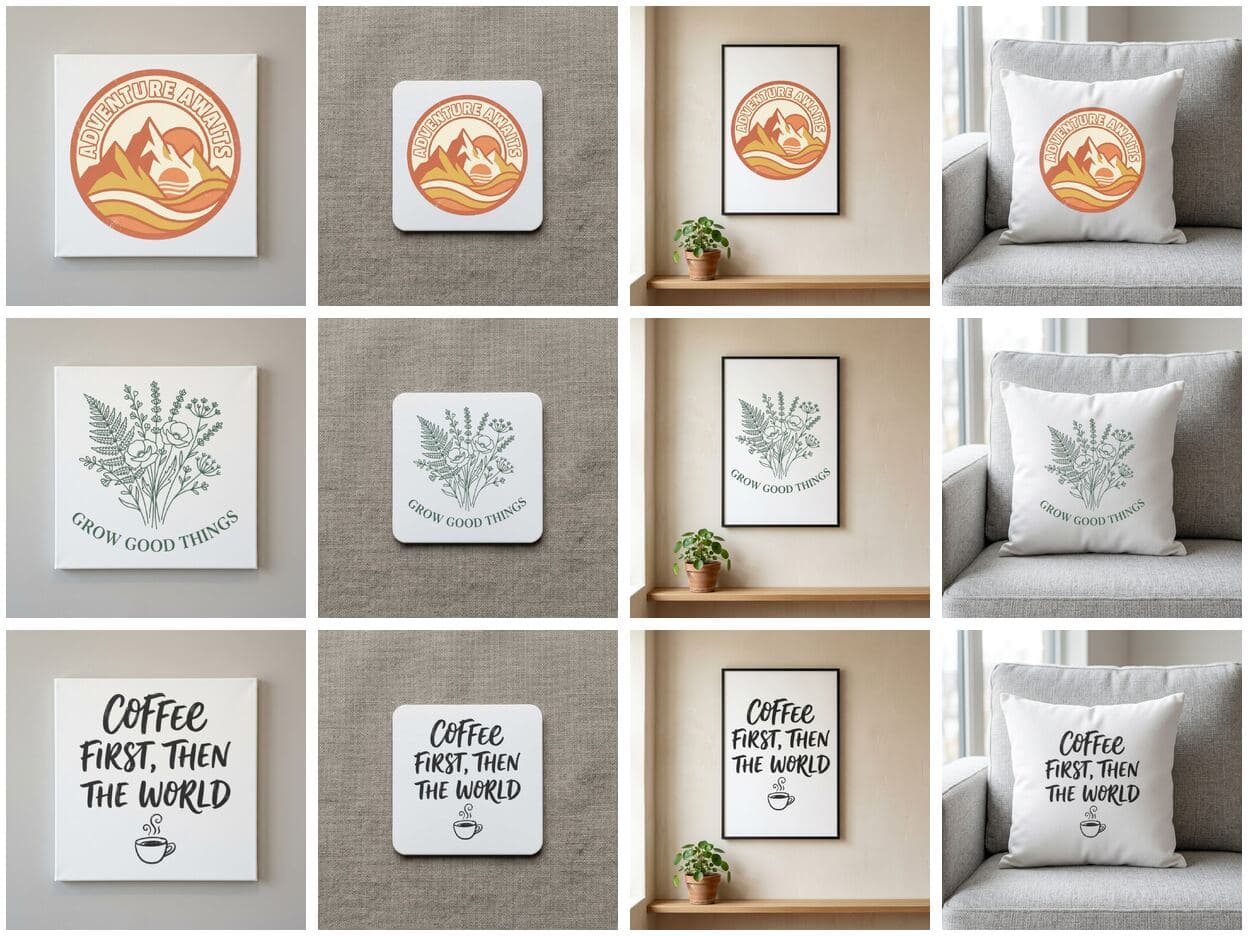
A mockup generator places a flat design onto a photo of a product, so a shop can show a poster on a wall or a sticker on a laptop without a photo shoot. A bulk mockup generator does the same placement for many designs and many product photos in a single run. Think of it as a grid: designs run down one side, scenes run across the other, and every cell is one finished image.
The grid is why bulk tools exist. A print-on-demand shop with 30 designs and 6 product types needs 180 images before every listing has a full set of photos. Producing those images by hand means opening a template, swapping the artwork, exporting, and repeating 180 times. A batch tool collapses that into one upload and one download.
How a batch runs in Mockraft
The workflow has four steps. First, upload up to 50 designs per batch as PNG, JPEG, or WebP files, each up to 20 MB. Second, choose the scenes you want from the library of 40+ scenes across 9 categories. Third, start the batch: Mockraft renders the full design × scene grid in the cloud, with several mockups in progress at the same time. Fourth, download everything as one ZIP when the batch completes.
Background removal runs automatically when a design needs it, so a logo exported on a white square still sits cleanly on a mug or a pillow. Because the scenes ship with the product, there are no template files to buy, no smart objects to configure, and nothing to install.
Batch versus one at a time
The time difference comes from multiplication, not from any single render being faster. Making one mockup by hand costs a fixed amount of attention: choose a template, place the design, check the edges, export, and rename the file. Multiply that by designs and scenes. 20 designs × 8 scenes is 160 repetitions of the same loop, while a batch asks for one upload, one scene selection, and one download regardless of the count.
Batches also change how a catalog gets maintained. When a design is revised, or a new scene is added, the grid can be rendered again in the same way instead of being rebuilt by hand. Shops that relist seasonally, such as holiday art or back-to-school stickers, tend to benefit most because the same product photos are reused every cycle.
How pricing models differ
Bulk tools charge in four different ways, and the model matters more than the headline price. Flat-rate pricing charges a monthly or yearly fee and does not meter renders. Credit pricing gives each plan a pool of credits that renders, exports, or AI features draw down. Product-cap pricing limits how many products or items a plan can process, and a Photoshop plugin charges for the plugin while you separately pay for Photoshop and source your own PSD templates.
Credits and caps make planning harder for bulk work, because a single large batch can use a big share of a pool. Mockraft is flat-rate: Pro is $15 / month or $99 / year with no credits, and the per-batch limit is 50 designs. The comparison table below lists what each tool's own pricing and feature pages stated on the verification date, and each source is linked at the end of the page.
What you get from a batch
On the Free plan, Mockraft renders mockups with a watermark and a maximum edge of 512 px, which is enough to check composition and see how a design reads on each scene. Pro removes the watermark and renders at full resolution, and allows up to 2 batches to run at once. The download is a ZIP of image files organized by the designs and scenes you chose.
Marketplaces and storefronts set their own image and mockup rules, and those rules change. Etsy, for example, publishes policies about listing images, so read the current policy for the platform you sell on before deciding which generated image becomes the main photo. Generated mockups are licensed for commercial use, but you remain responsible for owning the rights to the designs you upload.
Preparing designs for a clean batch
A batch is only as good as the files that go into it, so a few minutes of preparation pays off across every cell of the grid. Export each design at the largest size you have, because a low-resolution file is enlarged on big surfaces such as a canvas or a blanket and looks soft. Keep one design per file, and give the files clear names so you can tell the finished mockups apart inside the ZIP.
Check how a design behaves on light and dark surfaces before you start. A dark design on a black product disappears, and a white design on a white scene does the same, so it helps to choose scenes that suit each design instead of selecting everything. A sensible habit is to run a small first batch, with a few designs across a few scenes, review the results at full size, and only then upload the whole catalog. Because the Free plan renders without a limit, that test costs nothing.
Finally, decide how you will use the output before you render it. Listing photos, social posts, and print-ready previews each have different needs, and knowing which one you are making tells you which scenes to pick and how many variations are worth keeping.
Who a bulk generator suits, and who it does not
A bulk generator suits shops that publish designs faster than they can photograph them: print-on-demand sellers with dozens of designs, creators launching a collection, and anyone who relists the same artwork on several product types. It is also useful for agencies that hand clients a full set of product previews in one delivery.
It is not the right tool for every job. If you sell one product with one design and need a single image, a one-at-a-time editor is simpler and may be cheaper. Mockraft places designs on product scenes; it does not generate photos of people wearing garments, and it does not use your own photography as scenes. If you already own a library of PSD templates and work in Photoshop daily, a plugin can reuse that library directly.
| Tool | Bulk / batch | Limits | Price | Credits | Photoshop |
|---|---|---|---|---|---|
| Mockraft | Yes | 50 designs / batch; renders not metered | Free (watermark, 512 px) / $15 per month or $99 per year | No | Not required |
| Dynamic Mockups | Yes | Free: batch export up to 5 variations | Pro from $15 per month (annual billing) | Yes (Pro: 3,600 per year) | Not required |
| Mockey | Yes (Bulk Mode) | 50 items / batch; multi-shot needs Creator plan | Free (JPG) + paid plans | Not stated | Not required |
| MockupMaestro | Yes | Product count: Free 10 / Standard 500 / Professional 1,000 | $29.99 / $59.99 / $99.99 per month | No (product-count based) | Not required |
| Bulk Mockup | Yes (plugin) | Unlimited, installable on 2 machines | $10 per month or $77 per year | No | Required (CC 2022 or later) |
Frequently asked questions
- What is a bulk mockup generator?
- A bulk mockup generator renders many product mockups in one pass instead of one at a time. Mockraft takes every design you upload and every scene you pick, renders the full design × scene grid in a single batch, and delivers it as one ZIP.
- How many mockups can I generate in one batch?
- A batch takes up to 50 designs, rendered across as many scenes as you select. 50 designs × 3 scenes, for example, produces 150 mockups.
- What is the difference between a web tool and a Photoshop plugin?
- A web tool runs in the browser and usually includes its own scenes. A Photoshop plugin automates smart-object replacement inside Photoshop, so it needs a Photoshop subscription and PSD templates that you supply, and it renders on your own machine.
- Is there a free plan?
- Yes. Free renders are unlimited, with a watermark and a maximum edge of 512 px. Pro removes the watermark, renders at full resolution, and costs $15 / month or $99 / year.
- Can I use bulk mockups as Etsy listing photos?
- Etsy sets its own rules for listing images and for mockups, and they can change. Read the current Etsy listing image policy before choosing which generated image to use as the main photo. Generated mockups are licensed for commercial use.
- Does the generator make photos of people wearing my designs?
- No. Mockraft places designs on product scenes such as prints, stickers, mugs, and pillows. It does not generate photos of models wearing garments, and it does not use your own photography as scenes.
Sources
Related comparisons
More guides
- Mockup generator without Photoshop
- Etsy mockup generator for print-on-demand shops
- T-shirt mockup generator for print-on-demand sellers
- Hoodie and sweatshirt mockup generator
- Tote bag mockup generator for print-on-demand shops
- Poster mockup generator: framed wall scenes, A2 to A4
- Canvas print mockup generator: wrap, bleed, 300 DPI
- Pillow mockup generator: sizes, 150 DPI and full-bleed
- Notebook mockup generator for stationery sellers
- Baby onesie and apron mockup generator
- Mug mockup generator for ceramic mug listings
- Sticker mockup generator: die-cut and kiss-cut previews
- Phone case mockup generator for white, black, and clear cases
- Drinkware mockup generator for bottles, tumblers, and cans
- Blanket mockup generator: DPI, sizes and flat lay scene
- Towel mockup generator for beach and bath towels
- Candle mockup generator for jar candle sellers
- Cap mockup generator for baseball cap sellers
Last verified: 2026-10-06